-550x550.jpg "CH-STW-07 Professional AC Torque Wrench Set 17-29 mm (10-75 Nm)")
-550x550.jpg "CH-STW-07 Professional AC Torque Wrench Set 17-29 mm (10-75 Nm)")
-550x550.jpg "CH-STW-07 Professional AC Torque Wrench Set 17-29 mm (10-75 Nm)")
-550x550.jpg "CH-STW-07 Professional AC Torque Wrench Set 17-29 mm (10-75 Nm)")

-80x80.jpg "CH-STW-07 Professional AC Torque Wrench Set 17-29 mm (10-75 Nm)")
-80x80.jpg "CH-STW-07 Professional AC Torque Wrench Set 17-29 mm (10-75 Nm)")
-80x80.jpg "CH-STW-07 Professional AC Torque Wrench Set 17-29 mm (10-75 Nm)")
-80x80.jpg "CH-STW-07 Professional AC Torque Wrench Set 17-29 mm (10-75 Nm)")
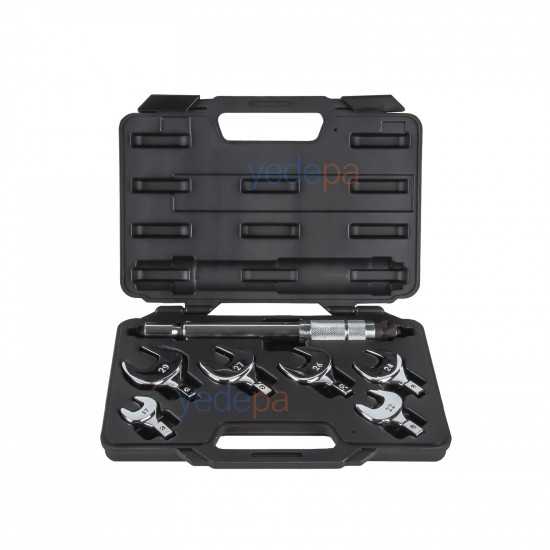
CH-STW-07 Professional AC Torque Wrench Set 17-29 mm (10-75 Nm)
- Stock: In Stock
- Brand: OEM
- Model: 01 41 495
$135.53 (VAT incl.)
Ex Tax: $112.94

Your shopping cart is empty!
The CH-STW-07 AC torque wrench set is a professional service kit used in split air conditioners and refrigeration systems to tighten flare nuts to the torque value specified by the manufacturer. The adjustable torque body works in the 10-75 Nm range, and the set comes in a black carrying case with six interchangeable open-end (crowfoot) heads: 17, 22, 24, 26, 27 and 29 mm.
Tightening torque is critical in flare connections: an under-tightened flare nut leaks refrigerant, while an over-tightened flare nut crushes and cracks the copper flare, and the leak often appears months later. With high-pressure refrigerants such as R410A and R32, this margin of error becomes even narrower. When the target value is reached, the torque wrench gives an audible "click" that tells you when to stop tightening; a measurable value replaces tightening by feel and experience.
Setting values specified in the manufacturer's manual (from the table in the box):
These values are the manual's reference table; if the equipment manufacturer specifies a different torque, its value takes precedence. The set covers 1/4"-5/8" flare nuts; for 3/4" and larger flare nuts, a larger head is required.
Loading...
Unlimited Blocks, Tabs or Accordions with any HTML content can be assigned to any individual product or to certain groups of products, like entire categories, brands, products with specific options, attributes, price range, etc. You can indicate any criteria via the advanced product assignment mechanism and only those products matching your criteria will display the modules.
Also, any module can be selectively activated per device (desktop/tablet/phone), customer login status and other criteria. Imagine the possibilities.